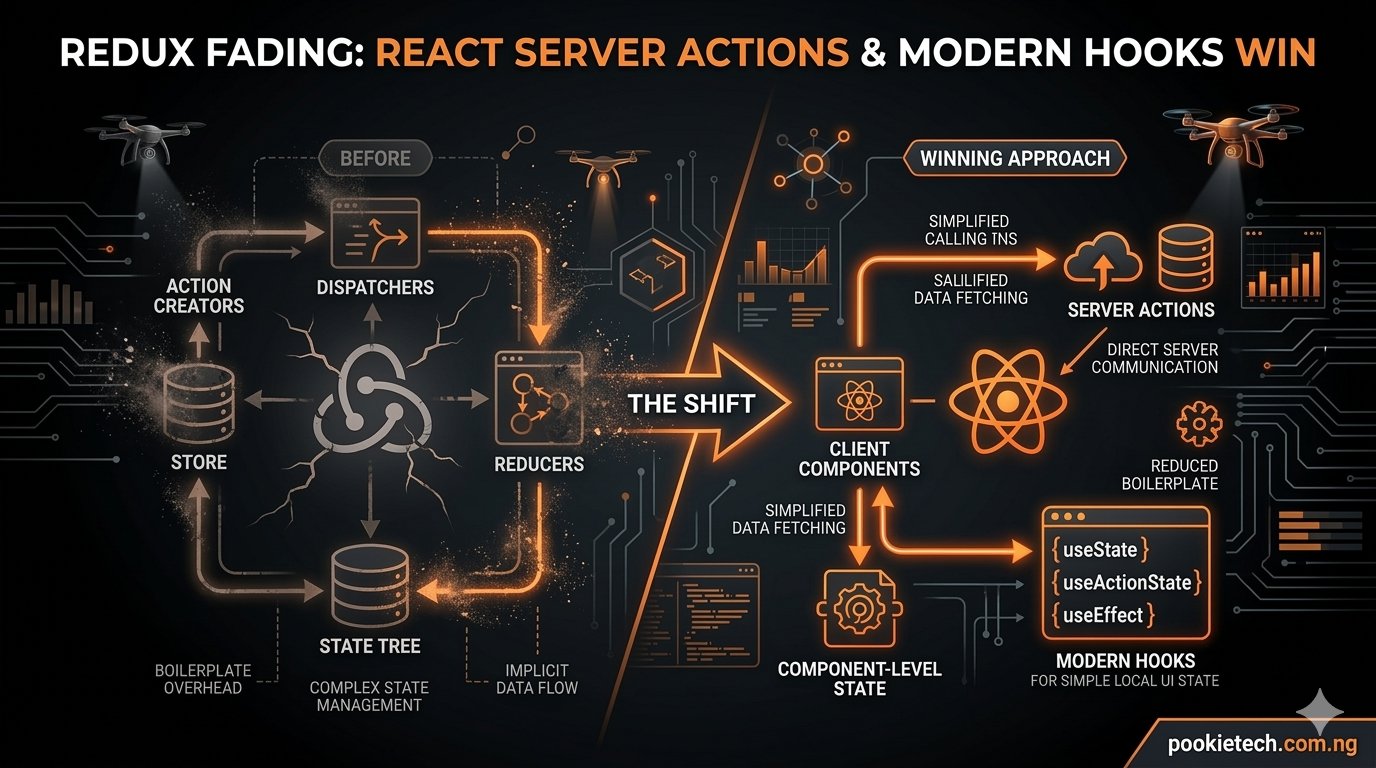
The Great Unbundling: Why Redux is Giving Way to React Server Actions and Modern Hooks
For years, if you were building a serious React application, you probably reached for Redux. It was the undisputed champion of global state management, promising predictable state and a single source of truth. But the landscape has shifted dramatically. Today, relying on heavy, centralized state management libraries like Redux often introduces more complexity and overhead than it solves, especially with the advent of React Server Components, Server Actions, and sophisticated data fetching hooks.
This isn't about declaring Redux "dead." It's about recognizing that the problems Redux was designed to solve in a client-side heavy world are now being addressed more efficiently and elegantly by a new generation of tools and paradigms built directly into React or specialized for specific concerns. We're moving towards a world where less client-side JavaScript, direct server interaction, and smart data fetching are the default, not an aspiration.
The Redux Era: Power and Pain
What Redux Solved
Back in the day, when React was primarily a client-side rendering library, managing application state across many components became a nightmare. Prop drilling was rampant, and components often held too much local state, leading to inconsistent UIs and difficult debugging. Redux emerged as a powerful solution, offering:
- Predictable State: A strict unidirectional data flow made it easier to understand how state changed.
- Centralized Store: A single object held all application state, accessible from anywhere.
- Time-Travel Debugging: Tools like Redux DevTools were revolutionary for inspecting state changes over time.
- Middleware: A powerful extension point for handling side effects (async operations, logging, etc.).
The Redux Burden
While Redux delivered on its promises, it came with a significant cost. The boilerplate alone was often daunting. You needed actions, action creators, reducers, a store, and often middleware like Redux Thunk or Redux Saga for asynchronous operations. This meant:
- Steep Learning Curve: New developers faced a wall of new concepts before they could even fetch data.
- Excessive Boilerplate: Even for simple state changes, you'd write multiple files and functions. Redux Toolkit (RTK) significantly reduced this, but the underlying mental model and structure remained.
- Increased Bundle Size: Redux and its associated libraries added kilobytes to your client-side bundle, slowing down initial page loads.
- Over-engineering for Simple Cases: Many applications didn't need the full power of Redux, but adopted it anyway, paying the complexity tax unnecessarily.
Let's look at a simple example using Redux Toolkit to manage a counter, just to illustrate the setup, even with modern Redux:
// src/store/counterSlice.js
import { createSlice } from '@reduxjs/toolkit';

const counterSlice = createSlice({
  name: 'counter',
  initialState: { value: 0 },
  reducers: {
    increment: (state) => {
      state.value += 1;
    },
    decrement: (state) => {
      state.value -= 1;
    },
    incrementByAmount: (state, action) => {
      state.value += action.payload;
    },
  },
});

export const { increment, decrement, incrementByAmount } = counterSlice.actions;
export default counterSlice.reducer;

// src/store/index.js
import { configureStore } from '@reduxjs/toolkit';
import counterReducer from './counterSlice';

export const store = configureStore({
  reducer: {
    counter: counterReducer,
  },
});

// src/App.js (or root component)
import React from 'react';
import { Provider } from 'react-redux';
import { store } from './store';
import Counter from './Counter';

function App() {
  return (

      <div>
        <h1>Redux Counter App</h1>
        <Counter />
      </div>
    </Provider>
  );
}

export default App;

// src/Counter.js
import React from 'react';
import { useSelector, useDispatch } from 'react-redux';
import { increment, decrement, incrementByAmount } from './store/counterSlice';

function Counter() {
  const count = useSelector((state) => state.counter.value);
  const dispatch = useDispatch();

  return (
    <div>
      <h2>Count: {count}</h2>
      <button onClick={() => dispatch(increment())}>Increment</button>
      <button onClick={() => dispatch(decrement())}>Decrement</button>
      <button onClick={() => dispatch(incrementByAmount(5))}>Increment by 5</button>
    </div>
  );
}

export default Counter;
Even with RTK, that's four files for a simple counter. Imagine this scale for complex application state and async data fetching.
React's Internal Evolution: Less is More
React itself has evolved significantly since Redux gained prominence. The introduction of Hooks in React 16.8 provided powerful primitives for managing state and side effects directly within functional components, often eliminating the need for external libraries for many common scenarios.
useState and useReducer: Local State Mastery
For component-specific or localized state, useState is the go-to. For more complex state logic within a component, or when state transitions depend on the previous state, useReducer offers a Redux-like pattern without the global store overhead.
// src/TaskReducer.js
import React, { useReducer } from 'react';

// Initial state for the reducer
const initialState = {
  tasks: [],
  newTask: '',
};

// Reducer function to handle state updates
function taskReducer(state, action) {
  switch (action.type) {
    case 'SET_NEW_TASK':
      return { ...state, newTask: action.payload };
    case 'ADD_TASK':
      if (state.newTask.trim() === '') return state;
      return {
        ...state,
        tasks: [...state.tasks, { id: Date.now(), text: state.newTask, completed: false }],
        newTask: '', // Clear input after adding
      };
    case 'TOGGLE_TASK':
      return {
        ...state,
        tasks: state.tasks.map((task) =>
          task.id === action.payload ? { ...task, completed: !task.completed } : task
        ),
      };
    case 'DELETE_TASK':
      return {
        ...state,
        tasks: state.tasks.filter((task) => task.id !== action.payload),
      };
    default:
      return state;
  }
}

function TaskList() {
  const [state, dispatch] = useReducer(taskReducer, initialState);

  const handleAddTask = () => {
    dispatch({ type: 'ADD_TASK' });
  };

  return (
    <div>
      <h2>Task List (using useReducer)</h2>
      <input
        type="text"
        value={state.newTask}
        onChange={(e) => dispatch({ type: 'SET_NEW_TASK', payload: e.target.value })}
        placeholder="Add a new task"
      />
      <button onClick={handleAddTask}>Add Task</button>

      <ul>
        {state.tasks.map((task) => (
          <li key={task.id} style={{ textDecoration: task.completed ? 'line-through' : 'none' }}>
            <input
              type="checkbox"
              checked={task.completed}
              onChange={() => dispatch({ type: 'TOGGLE_TASK', payload: task.id })}
            />
            {task.text}
            <button onClick={() => dispatch({ type: 'DELETE_TASK', payload: task.id })} style={{ marginLeft: '10px' }}>
              Delete
            </button>
          </li>
        ))}
      </ul>
    </div>
  );
}

export default TaskList;
This provides a clean, self-contained way to manage complex state logic without impacting other parts of the application or adding global dependencies.
useContext: The Global State Lite
For state that needs to be shared across a subset of the component tree, but not necessarily globally managed with Redux's complexity, useContext is an excellent choice. It avoids prop drilling and provides a straightforward way to inject values (state, functions, themes, user info) into components.
// src/ThemeContext.js
import React, { createContext, useState, useContext } from 'react';

// 1. Create the Context
const ThemeContext = createContext(null);

// 2. Create a Provider Component
export function ThemeProvider({ children }) {
  const [theme, setTheme] = useState('light'); // Default theme

  const toggleTheme = () => {
    setTheme((prevTheme) => (prevTheme === 'light' ? 'dark' : 'light'));
  };

  const contextValue = { theme, toggleTheme };

  return (
    <ThemeContext.Provider value={contextValue}>
      {children}
    </ThemeContext.Provider>
  );
}

// 3. Create a Custom Hook for Consumers (optional, but good practice)
export function useTheme() {
  const context = useContext(ThemeContext);
  if (!context) {
    throw new Error('useTheme must be used within a ThemeProvider');
  }
  return context;
}

// src/ThemeToggler.js
import React from 'react';
import { useTheme } from './ThemeContext';

function ThemeToggler() {
  const { theme, toggleTheme } = useTheme();

  return (
    <button onClick={toggleTheme}>
      Switch to {theme === 'light' ? 'Dark' : 'Light'} Theme
    </button>
  );
}

export default ThemeToggler;

// src/ThemedComponent.js
import React from 'react';
import { useTheme } from './ThemeContext';

function ThemedComponent() {
  const { theme } = useTheme();

  const style = {
    backgroundColor: theme === 'light' ? '#f0f0f0' : '#333',
    color: theme === 'light' ? '#333' : '#f0f0f0',
    padding: '20px',
    borderRadius: '8px',
  };

  return (
    <div style={style}>
      <h3>This component respects the {theme} theme.</h3>
      <p>Current theme is: {theme}</p>
    </div>
  );
}

export default ThemedComponent;

// src/App.js (or root component)
import React from 'react';
import { ThemeProvider } from './ThemeContext';
import ThemeToggler from './ThemeToggler';
import ThemedComponent from './ThemedComponent';
import TaskList from './TaskReducer'; // Assuming previous example is integrated

function App() {
  return (
    <ThemeProvider>
      <div style={{ padding: '20px' }}>
        <h1>Modern React App</h1>
        <ThemeToggler />
        <ThemedComponent />
        <hr />
        <TaskList />
      </div>
    </ThemeProvider>
  );
}

export default App;
While useContext doesn't offer the performance optimizations for frequent updates that a library like Redux provides (consumers re-render when context value changes), it's perfectly adequate for static or infrequently updated global state like themes or user authentication status.
The Rise of Smart Data Fetching Libraries
One of Redux's biggest use cases was managing asynchronous data fetching and its associated states (loading, error, success). However, this is a complex problem that generic state managers aren't ideally suited for. Enter specialized data fetching libraries like TanStack Query (formerly React Query) and SWR.
TanStack Query (React Query) and SWR: A Paradigm Shift
These libraries are not state management libraries in the Redux sense. Instead, they are intelligent data synchronization tools for your server state. They handle the hard problems of data fetching, caching, revalidation, and synchronization, letting you focus on UI.
Key benefits:
- Automatic Caching: Data is cached out-of-the-box, significantly improving perceived performance.
- Background Revalidation: Stale data is automatically re-fetched in the background, keeping your UI fresh.
- Optimistic Updates: UI updates immediately after a mutation, then reconciles with the server response, providing a snappy user experience.
- Error Handling & Retries: Built-in mechanisms for handling network errors and retrying failed requests.
- Deduping Requests: Prevents multiple identical requests from being sent simultaneously.
- DevTools: Excellent debugging tools to inspect cache, queries, and mutations.
Here's how you might fetch a list of posts using TanStack Query (v5):
// src/api.js (a simple API utility)
export async function fetchPosts() {
  const response = await fetch('https://jsonplaceholder.typicode.com/posts');
  if (!response.ok) {
    throw new Error('Failed to fetch posts');
  }
  return response.json();
}

export async function addPost(newPost) {
  const response = await fetch('https://jsonplaceholder.typicode.com/posts', {
    method: 'POST',
    headers: {
      'Content-Type': 'application/json',
    },
    body: JSON.stringify(newPost),
  });
  if (!response.ok) {
    throw new Error('Failed to add post');
  }
  return response.json();
}

// src/PostsList.js
import React from 'react';
import { useQuery, useMutation, QueryClient, QueryClientProvider } from '@tanstack/react-query';
import { fetchPosts, addPost } from './api'; // Assuming api.js from above

// Create a client
const queryClient = new QueryClient();

function PostsList() {
  // Query for fetching posts
  const { data: posts, isLoading, isError, error } = useQuery({
    queryKey: ['posts'], // Unique key for this query
    queryFn: fetchPosts, // Function to fetch data
  });

  // Mutation for adding a new post
  const addPostMutation = useMutation({
    mutationFn: addPost,
    onSuccess: () => {
      // Invalidate and refetch all 'posts' queries after a successful mutation
      queryClient.invalidateQueries({ queryKey: ['posts'] });
      alert('Post added successfully!');
    },
    onError: (err) => {
      alert(`Error adding post: ${err.message}`);
    },
  });

  if (isLoading) return <div>Loading posts...</div>;
  if (isError) return <div>Error: {error.message}</div>;

  const handleAddPost = () => {
    const newPost = {
      title: `New Post ${Math.random().toFixed(2)}`,
      body: 'This is a new post body.',
      userId: 1,
    };
    addPostMutation.mutate(newPost);
  };

  return (
    <div>
      <h2>Posts (using TanStack Query)</h2>
      <button onClick={handleAddPost} disabled={addPostMutation.isPending}>
        {addPostMutation.isPending ? 'Adding...' : 'Add New Post'}
      </button>
      <ul>
        {posts.map((post) => (
          <li key={post.id}>
            <strong>{post.title}</strong>
            <p>{post.body.substring(0, 50)}...</p>
          </li>
        ))}
      </ul>
    </div>
  );
}

// Wrap your app with QueryClientProvider
function AppWithQueryClient() {
  return (
    <QueryClientProvider client={queryClient}>
      <PostsList />
    </QueryClientProvider>
  );
}

export default AppWithQueryClient;
Notice how isLoading, isError, and error states are handled automatically. The onSuccess callback for mutations automatically invalidates and refetches relevant queries, keeping your UI in sync with the server without manual Redux actions or thunks.
The Game Changer: React Server Components and Server Actions
This is arguably the most significant shift away from client-side state management. React Server Components (RSC) and React Server Actions (RSA), especially within frameworks like Next.js 13+ (App Router), fundamentally change how we think about data fetching and mutations by blurring the line between client and server.
React Server Components (RSC): Bringing Data Closer
RSCs allow you to fetch data directly on the server and render parts of your component tree there. The HTML and CSS are sent to the client, along with minimal JavaScript for interactive client components. This means:
- Zero Client-Side JavaScript for Data Fetching: No need for client-side libraries like TanStack Query or Redux for initial data loads.
- Reduced Bundle Size: Less JavaScript shipped to the browser.
- Faster Initial Page Loads: Data is fetched and rendered on the server, resulting in a quicker "time to first byte" and "first contentful paint."
- Direct Database Access: Server Components can directly interact with databases or internal APIs without exposing credentials to the client.
Consider a simple product listing page in Next.js 14:
// app/products/page.js (This is a React Server Component by default in Next.js App Router)

// Simulate a database call
async function getProducts() {
  // In a real app, this would be a direct database query or an internal API call.
  // This code runs ONLY on the server.
  const response = await fetch('https://fakestoreapi.com/products?limit=5', { cache: 'no-store' }); // Example: no-store to always refetch
  const products = await response.json();
  return products;
}

export default async function ProductsPage() {
  const products = await getProducts(); // Data fetching happens directly on the server

  return (
    <div>
      <h1>Our Products (Server Component)</h1>
      <ul>
        {products.map((product) => (
          <li key={product.id}>
            <h2>{product.title}</h2>
            <p>${product.price}</p>
            <p>{product.description.substring(0, 100)}...</p>
          </li>
        ))}
      </ul>
    </div>
  );
}
The getProducts function runs entirely on the server. The data is fetched, the component is rendered to HTML, and that HTML is streamed to the client. No client-side JavaScript for the data fetching part, no loading spinners for the initial render, and no Redux store to manage this data.
React Server Actions (RSA): Mutations Without APIs
Server Actions take the server-first approach a step further, enabling you to define functions that run securely on the server, but can be invoked directly from client components. This dramatically simplifies mutations, form submissions, and data updates by eliminating the need to build and maintain explicit API endpoints for every interaction.
- Direct Function Calls: Call server functions directly from client-side event handlers.
- Reduced API Layer: Fewer REST or GraphQL endpoints needed for simple mutations.
- Automatic Revalidation: Frameworks like Next.js can automatically revalidate cached data and re-render affected Server Components after a Server Action.
- Security: Server Actions run on the server, so sensitive logic and database interactions remain secure.
Here's an example of a form submission using a Server Action in Next.js 14:
// app/add-product/page.js (This is a React Server Component)
import { revalidatePath } from 'next/cache';

// This function runs ONLY on the server
async function createProduct(formData) {
  'use server'; // Marks this function as a Server Action

  const name = formData.get('name');
  const price = formData.get('price');
  const description = formData.get('description');

  // In a real app, you'd save this to a database
  console.log('Saving product to database:', { name, price, description });
  // Simulate a database save
  await new Promise(resolve => setTimeout(resolve, 1000));

  // After saving, revalidate the products page to show the new product
  revalidatePath('/products');

  return { success: true, message: `Product "${name}" added!` };
}

export default function AddProductPage() {
  return (
    <div>
      <h1>Add New Product (Server Action)</h1>
      <form action={createProduct}> {/* Call the server action directly */}
        <label>
          Product Name:
          <input type="text" name="name" required />
        </label>
        <br />
        <label>
          Price:
          <input type="number" name="price" step="0.01" required />
        </label>
        <br />
        <label>
          Description:
          <textarea name="description" rows="4" required></textarea>
        </label>
        <br />
        <button type="submit">Add Product</button>
      </form>
    </div>
  );
}

// app/products/page.js (The page that displays products, which will revalidate)
// (Same as previous RSC example, but now will show new products after form submission)
// ...
The createProduct function is defined in a Server Component file, marked with 'use server'. It's then passed directly to the form's action prop. When the form is submitted, React handles the serialization and execution of this function on the server. No client-side JavaScript for the form submission logic, no Redux actions, thunks, or API calls to manage.
Native Fetching: Back to Basics, But Better
fetch API with async/await: The Unsung Hero
With the power of modern JavaScript (async/await) and the native fetch API, many simple data fetching scenarios on the client side don't even need a library. When combined with useState for loading/error states, it's a perfectly viable and lightweight solution.
While TanStack Query and SWR offer powerful caching and revalidation, for a one-off fetch or data that doesn't require complex synchronization, plain fetch is often sufficient, especially when you consider that much of your initial data will now come from Server Components.
// src/SimpleDataFetcher.js
import React, { useState, useEffect } from 'react';

function SimpleDataFetcher() {
  const [data, setData] = useState(null);
  const [isLoading, setIsLoading] = useState(true);
  const [error, setError] = useState(null);

  useEffect(() => {
    async function fetchData() {
      try {
        const response = await fetch('https://api.publicapis.org/entries?category=Animals');
        if (!response.ok) {
          throw new Error(`HTTP error! status: ${response.status}`);
        }
        const result = await response.json();
        setData(result.entries.slice(0, 5)); // Just take first 5 for brevity
      } catch (err) {
        setError(err);
      } finally {
        setIsLoading(false);
      }
    }

    fetchData();
  }, []); // Empty dependency array means this runs once on mount

  if (isLoading) return <div>Loading data...</div>;
  if (error) return <div>Error: {error.message}</div>;

  return (
    <div>
      <h2>Public APIs (Native Fetch)</h2>
      <ul>
        {data.map((entry, index) => (
          <li key={index}>
            <strong>{entry.API}</strong>: {entry.Description}
          </li>
        ))}
      </ul>
    </div>
  );
}

export default SimpleDataFetcher;
This approach is perfectly fine for many client-side data needs, demonstrating that not every piece of data requires a heavy state management solution or even a dedicated data fetching library if the requirements are simple.
Performance and Bundle Size: The Real Wins
The shift away from heavy client-side libraries is fundamentally about improving performance and developer experience. Let's compare the impact:
| Feature | Traditional Redux Stack (with RTK, Thunk/Saga) | Modern React Stack (RSC, RSA, TanStack Query) |
|---|---|---|
| Bundle Size (Client) | Higher (Redux, RTK, middleware, selectors, data fetching logic adds significant JS) | Significantly Lower (RSC runs on server, TanStack Query is smaller than Redux, less custom data fetching JS) |
| Initial Load Time (TTFB, FCP) | Slower (more client JS to download, parse, execute; data often fetched after hydrate) | Faster (data fetched on server, HTML streamed, minimal JS for initial render) |
| Data Fetching Location | Primarily Client-side (AJAX calls from browser) | Server-side (RSC, RSA) or Client-side (TanStack Query, native fetch) |
| Data Fetching Complexity | Boilerplate for actions, reducers, thunks, state for loading/error. Manual caching. | Declarative hooks (TanStack Query), direct server calls (RSC/RSA), automatic caching/revalidation. |